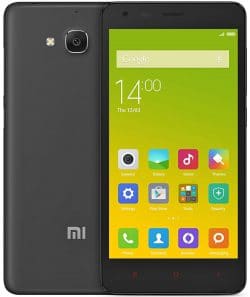
Official REDMI 2A firmware (codename lte26007) includes the latest stable MIUI 9 update with Android 4.4 and all original previous versions, in Fastboot ROM flash file, Recovery ROM, and OTA formats.
Phone models: 2014502 (2A), 2014512 (2A Prime), 2014055 (2A Prime). All files are stock Xiaomi ROMs, downloaded directly from Xiaomi servers. We provide direct download links to official firmware, system and software updates.
Latest firmware updates:
Latest OS
MIUI 9, Android 4.4
China MIUI 9.2.3.0.KHLCNEK
The latest Chinese MIUI version for REDMI 2A:
Recovery ROM
- Version
- 9.2.3.0.KHLCNEK
- OS
- MIUI 9
- Android
- Android 4.4
- Release date
- 2018-09-07
- File size
- 530.52 MB
- Official link
- Download (.zip)
- Changelog
Expand list
MIUI9 Lightning fast
- Deep-level system optimizations
- Added improved image search
- Simpler Home screen editing
- Smart notifications filter
- Shortcuts for frequently used features on the left side of the Lock screen
- Improved readability for the start page of Messaging
- Revamped and simplified 50+ features
- Introducing MIUI Labs
- Image search is turned on in MIUI Labs
Turn the filter for notifications on and off in the Settings.
Lockscreen, Status Bar, Notification Bar
- Optimization - Adjusted time for tapping the Lock screen notifications(10-24)
- Fix - The search bar in the Notification shade wasn`t displayed correctly(06-27)
Home screen
- Optimization - Folders open faster(07-10)
- Optimization - Users can set their main Home screen in the editing mode(08-29)
- Optimization - Multiple themes supported on the clock widget(10-19)
- Optimization - Adding widgets to an empty spot with a single tap(10-31)
Themes
- Optimization - Redesigned home page(08-24)
- Optimization - Updated Peach blossom and Asphalt themes(09-14)
- Optimization - Hide free and incompatible themes in the list of the purchased items(10-10)
- Optimization - `Add to favorites` icon adjustments(10-24)
- Optimization - Launching speed(07-01)
Mi Account
- Optimization - Reduced the number of push notifications when the user is signed out(10-30)
Quick Ball
- New - Quick ball goes back to the edge after 3 seconds of inactivity(08-30)
Fastboot ROM (flash file)
- Version
- 9.2.3.0.KHLCNEK
- OS
- MIUI 9
- Android
- Android 4.4
- Release date
- 2017-12-29
- Flash file size
- 965.18 MB
- Official link
- Download (.tgz)
- Changelog
Expand list
MIUI9 Lightning fast
- Deep-level system optimizations
- Added improved image search
- Simpler Home screen editing
- Smart notifications filter
- Shortcuts for frequently used features on the left side of the Lock screen
- Improved readability for the start page of Messaging
- Revamped and simplified 50+ features
- Introducing MIUI Labs
- Image search is turned on in MIUI Labs
Turn the filter for notifications on and off in the Settings.
Lockscreen, Status Bar, Notification Bar
- Optimization - Adjusted time for tapping the Lock screen notifications(10-24)
- Fix - The search bar in the Notification shade wasn`t displayed correctly(06-27)
Home screen
- Optimization - Folders open faster(07-10)
- Optimization - Users can set their main Home screen in the editing mode(08-29)
- Optimization - Multiple themes supported on the clock widget(10-19)
- Optimization - Adding widgets to an empty spot with a single tap(10-31)
Themes
- Optimization - Redesigned home page(08-24)
- Optimization - Updated Peach blossom and Asphalt themes(09-14)
- Optimization - Hide free and incompatible themes in the list of the purchased items(10-10)
- Optimization - `Add to favorites` icon adjustments(10-24)
- Optimization - Launching speed(07-01)
Mi Account
- Optimization - Reduced the number of push notifications when the user is signed out(10-30)
Quick Ball
- New - Quick ball goes back to the edge after 3 seconds of inactivity(08-30)
REDMI 2A has reached EOL (end-of-life) status in Xiaomi's official catalog: support has ended, new firmware and security patches are no longer released, and the device will not receive MIUI 10.
The new MIUI 9 update is not necessarily the best. Before updating REDMI 2A (lte26007), read reviews on XDA Developers or the Mi Community forum. If installing full ROM or the new OTA update caused issues, please let us know in the comments and mention the firmware region and version number.













My xiaomi redmin 2 do not show all apps and it say I’d error app unavailable
Your phone is too old.
My Phone is stuck on the logo is not turning on tried flashing but it’s say file mismatch
You need to go to the service center.
i like this programs